
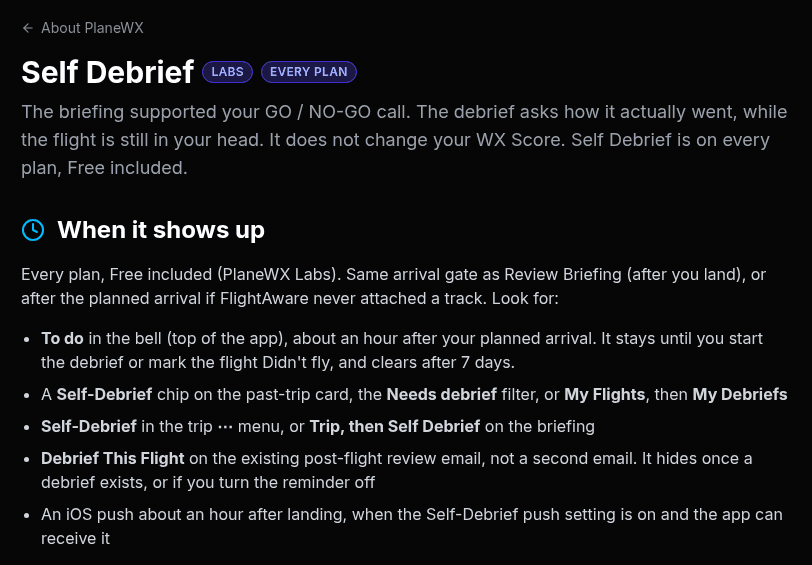
St. Petersburg, Florida. October 2, 2026. Self Debrief is now on every PlaneWX plan, Free included. It used to be a Pro Plus feature. Not anymore.
Here's why. The debrief is where good habits get built: how did that flight actually go, what did the weather really do, and what do you want to take into the next trip? That's a safety tool, and safety isn't premium. So every pilot gets it.
What it is
Your briefing supported your GO / NO-GO call. The debrief asks how it actually went, while the flight is still in your head. You work top to bottom: flight purpose, how you navigated, a rating for how you did, mental sharpness, a FRAT look-back, discipline, weather, then the phases of the flight. The stars mean how you flew, not how fun it was. It saves as you go, and it doesn't change your WX Score.
Debrief it once you're on the ground
You don't have to go looking for it. After you land, the post-flight review email you already get has a Debrief This Flight button. The bell at the top of the app also shows a To do item about an hour after your planned arrival. It stays until you start the debrief or mark the flight Didn't fly. Tap either one and you're in the debrief for that flight.
Where to find it
You can also get there yourself. Open the Profile menu and pick My Flights. On the My Flights page, choose My Debriefs.
Yours by default
Private notes never leave your account. Mentors, Trip Watchers, groups and your public profile never see them. A mentor or CFI sees the rest of a debrief only if you turn on Self-debrief access for that person in My Crew. It's off by default, and they can't edit your answers.
Self Debrief is part of PlaneWX Labs, our early access features, so it's still growing. Tell us what you'd like it to ask. The full guide is at app.planewx.ai/help/self-debrief.
About PlaneWX
Fly like it's your job. PlaneWX is the decision support system for general aviation. It gives pilots professional-grade tools and builds professional-grade habits that make flying safer. The loop is WX Score, FRAT, GO / NO-GO and Self Debrief (early access). PlaneWX never recommends GO or NO-GO. The pilot makes the call.
Media contact
Mark Wolfgang, PlaneWX
hello@planewx.ai
www.planewx.ai